新增齐鲁pad笼位更新操作压测脚本
新增华东师范大学二期笼位管理并发入驻笼位压测脚本
新增华东师范大学二期笼位管理并发笼位标记压测脚本
15 files added
3 files modified
| | |
|---|
| | | <?xml version="1.0" encoding="UTF-8"?> |
|---|
| | | <project version="4"> |
|---|
| | | <component name="Black"> |
|---|
| | | <option name="sdkName" value="Python 3.12 (登录获取token)" /> |
|---|
| | | </component> |
|---|
| | | <component name="ProjectRootManager" version="2" project-jdk-name="Python 3.12 (登录获取token)" project-jdk-type="Python SDK" /> |
|---|
| | | </project> |
|---|
| | |
|---|
| | | <project version="4"> |
|---|
| | | <component name="VcsDirectoryMappings"> |
|---|
| | | <mapping directory="" vcs="Git" /> |
|---|
| | | <mapping directory="$PROJECT_DIR$/测试组/脚本/造数脚本" vcs="Git" /> |
|---|
| | | </component> |
|---|
| | | </project> |
|---|
| New file |
| | |
|---|
| | | # 默认忽略的文件 |
|---|
| | | /shelf/ |
|---|
| | | /workspace.xml |
|---|
| | | # 基于编辑器的 HTTP 客户端请求 |
|---|
| | | /httpRequests/ |
|---|
| | | # Datasource local storage ignored files |
|---|
| | | /dataSources/ |
|---|
| | | /dataSources.local.xml |
|---|
| New file |
| | |
|---|
| | | <component name="InspectionProjectProfileManager"> |
|---|
| | | <profile version="1.0"> |
|---|
| | | <option name="myName" value="Project Default" /> |
|---|
| | | <inspection_tool class="Eslint" enabled="true" level="WARNING" enabled_by_default="true" /> |
|---|
| | | </profile> |
|---|
| | | </component> |
|---|
| New file |
| | |
|---|
| | | <component name="InspectionProjectProfileManager"> |
|---|
| | | <settings> |
|---|
| | | <option name="USE_PROJECT_PROFILE" value="false" /> |
|---|
| | | <version value="1.0" /> |
|---|
| | | </settings> |
|---|
| | | </component> |
|---|
| New file |
| | |
|---|
| | | <?xml version="1.0" encoding="UTF-8"?> |
|---|
| | | <project version="4"> |
|---|
| | | <component name="ProjectRootManager" version="2" project-jdk-name="Python 3.12 (登录获取token)" project-jdk-type="Python SDK" /> |
|---|
| | | </project> |
|---|
| New file |
| | |
|---|
| | | <?xml version="1.0" encoding="UTF-8"?> |
|---|
| | | <project version="4"> |
|---|
| | | <component name="ProjectModuleManager"> |
|---|
| | | <modules> |
|---|
| | | <module fileurl="file://$PROJECT_DIR$/.idea/测试组.iml" filepath="$PROJECT_DIR$/.idea/测试组.iml" /> |
|---|
| | | </modules> |
|---|
| | | </component> |
|---|
| | | </project> |
|---|
| New file |
| | |
|---|
| | | <?xml version="1.0" encoding="UTF-8"?> |
|---|
| | | <project version="4"> |
|---|
| | | <component name="VcsDirectoryMappings"> |
|---|
| | | <mapping directory="$PROJECT_DIR$/.." vcs="Git" /> |
|---|
| | | </component> |
|---|
| | | </project> |
|---|
| New file |
| | |
|---|
| | | <?xml version="1.0" encoding="UTF-8"?> |
|---|
| | | <module type="PYTHON_MODULE" version="4"> |
|---|
| | | <component name="FacetManager"> |
|---|
| | | <facet type="django" name="Django"> |
|---|
| | | <configuration> |
|---|
| | | <option name="rootFolder" value="$MODULE_DIR$/Test_platform/Interface_automation/backend" /> |
|---|
| | | <option name="settingsModule" value="backend/settings.py" /> |
|---|
| | | <option name="manageScript" value="$MODULE_DIR$/Test_platform/Interface_automation/backend/manage.py" /> |
|---|
| | | <option name="environment" value="<map/>" /> |
|---|
| | | <option name="doNotUseTestRunner" value="false" /> |
|---|
| | | <option name="trackFilePattern" value="migrations" /> |
|---|
| | | </configuration> |
|---|
| | | </facet> |
|---|
| | | </component> |
|---|
| | | <component name="NewModuleRootManager"> |
|---|
| | | <content url="file://$MODULE_DIR$"> |
|---|
| | | <excludeFolder url="file://$MODULE_DIR$/脚本/登录获取token/.venv" /> |
|---|
| | | </content> |
|---|
| | | <orderEntry type="inheritedJdk" /> |
|---|
| | | <orderEntry type="sourceFolder" forTests="false" /> |
|---|
| | | </component> |
|---|
| | | <component name="TemplatesService"> |
|---|
| | | <option name="TEMPLATE_CONFIGURATION" value="Django" /> |
|---|
| | | <option name="TEMPLATE_FOLDERS"> |
|---|
| | | <list> |
|---|
| | | <option value="$MODULE_DIR$/Test_platform/Interface_automation/backend/templates" /> |
|---|
| | | </list> |
|---|
| | | </option> |
|---|
| | | </component> |
|---|
| | | </module> |
|---|
| New file |
| | |
|---|
| | | index,timestamp,datetime,status_code,latency_ms,response_size,error |
|---|
| | | 6,1767052261.0421598,2025-12-30 07:51:01,200,1909.2257022857666,6, |
|---|
| | | 5,1767052261.3560977,2025-12-30 07:51:01,200,2225.161552429199,6, |
|---|
| | | 10,1767052261.6649218,2025-12-30 07:51:01,200,2529.99210357666,6, |
|---|
| | | 3,1767052261.9790692,2025-12-30 07:51:01,200,2851.1316776275635,6, |
|---|
| | | 2,1767052262.312085,2025-12-30 07:51:02,200,3186.147451400757,6, |
|---|
| | | 8,1767052262.6506426,2025-12-30 07:51:02,200,3516.7152881622314,6, |
|---|
| | | 1,1767052263.026816,2025-12-30 07:51:03,200,3902.883529663086,6, |
|---|
| | | 7,1767052263.305449,2025-12-30 07:51:03,200,4172.514915466309,6, |
|---|
| | | 9,1767052263.652629,2025-12-30 07:51:03,200,4517.699241638184,6, |
|---|
| | | 4,1767052263.9463022,2025-12-30 07:51:03,200,4816.370725631714,6, |
|---|
| New file |
| | |
|---|
| | | |
|---|
| | | <!doctype html> |
|---|
| | | <html lang="zh-CN"> |
|---|
| | | <head> |
|---|
| | | <meta charset="utf-8"> |
|---|
| | | <title>压测详细报告</title> |
|---|
| | | <style> |
|---|
| | | body{font-family: -apple-system, BlinkMacSystemFont, 'Segoe UI', Roboto, 'Helvetica Neue', Arial; padding:20px} |
|---|
| | | h2{color:#2c3e50} |
|---|
| | | table{border-collapse:collapse; width:100%} |
|---|
| | | th,td{padding:6px; text-align:left} |
|---|
| | | </style> |
|---|
| | | </head> |
|---|
| | | <body> |
|---|
| | | <h1>压测详细报告</h1> |
|---|
| | | |
|---|
| | | <h2>摘要</h2> |
|---|
| | | <ul> |
|---|
| | | <li>报告名称:压测详细报告</li> |
|---|
| | | <li>生成时间:2025-12-30 07:51:04</li> |
|---|
| | | <li>总请求数:10</li> |
|---|
| | | <li>成功数:10,失败数:0,成功率:100.00%</li> |
|---|
| | | <li>总耗时(秒):2.90</li> |
|---|
| | | <li>平均吞吐(req/s):3.44</li> |
|---|
| | | </ul> |
|---|
| | | |
|---|
| | | |
|---|
| | | <h2>响应时间统计 (ms)</h2> |
|---|
| | | <ul> |
|---|
| | | <li>最小:1909.23</li> |
|---|
| | | <li>最大:4816.37</li> |
|---|
| | | <li>平均:3362.78</li> |
|---|
| | | <li>中位数(P50):3351.43</li> |
|---|
| | | <li>P90:4547.57,P95:4681.97,P99:4789.49</li> |
|---|
| | | </ul> |
|---|
| | | |
|---|
| | | <h2>状态码分布</h2><ul><li>200: 10</li></ul> |
|---|
| | | <h2>错误汇总</h2><p>无错误记录</p> |
|---|
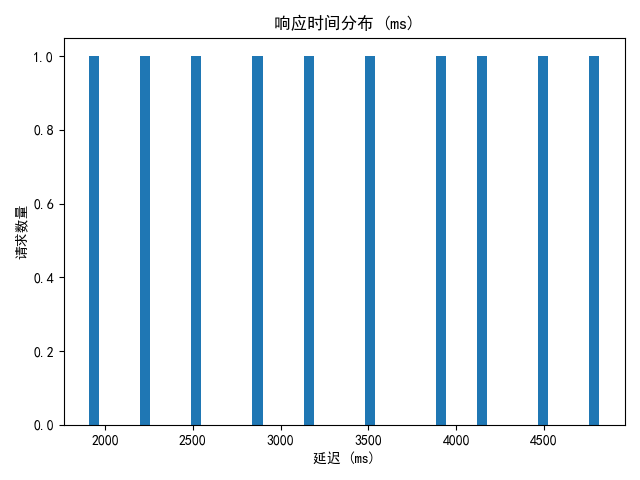
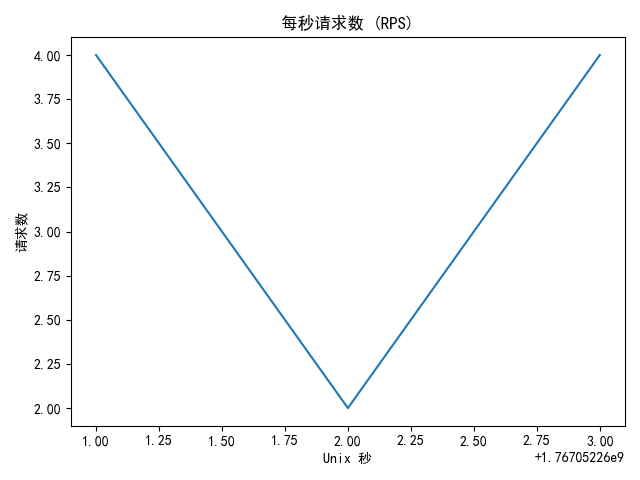
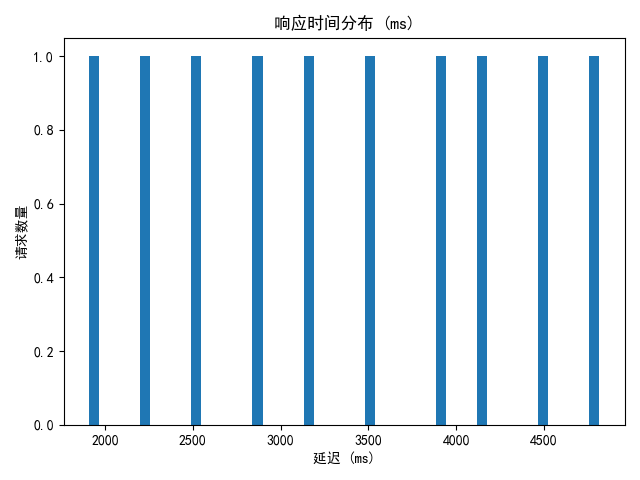
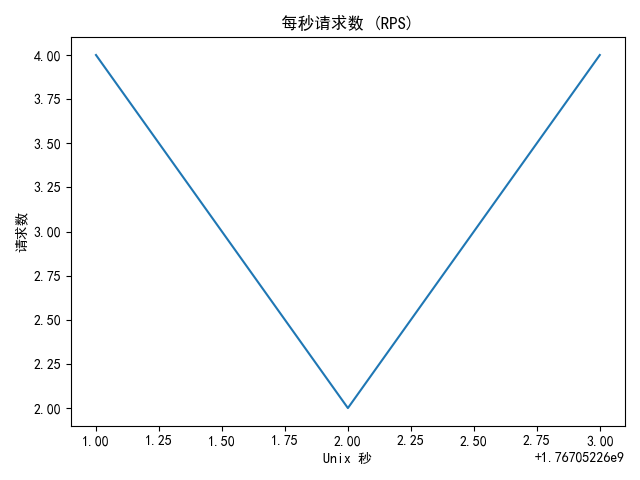
| | | <h2>图表</h2><div><h3>latency_hist</h3><img src="压测任务_20251230_075103_latency_hist.png" alt="latency_hist" style="max-width:100%;height:auto;"/></div><div><h3>rps</h3><img src="压测任务_20251230_075103_rps.png" alt="rps" style="max-width:100%;height:auto;"/></div> |
|---|
| | | |
|---|
| | | <h2>请求明细(仅显示前100条)</h2> |
|---|
| | | <table border="1" cellpadding="4" cellspacing="0"> |
|---|
| | | <tr><th>#</th><th>时间</th><th>状态码</th><th>延迟(ms)</th><th>响应大小</th><th>错误</th></tr> |
|---|
| | | <tr><td>6</td><td>2025-12-30 07:51:01</td><td>200</td><td>1909.2257022857666</td><td>6</td><td></td></tr><tr><td>5</td><td>2025-12-30 07:51:01</td><td>200</td><td>2225.161552429199</td><td>6</td><td></td></tr><tr><td>10</td><td>2025-12-30 07:51:01</td><td>200</td><td>2529.99210357666</td><td>6</td><td></td></tr><tr><td>3</td><td>2025-12-30 07:51:01</td><td>200</td><td>2851.1316776275635</td><td>6</td><td></td></tr><tr><td>2</td><td>2025-12-30 07:51:02</td><td>200</td><td>3186.147451400757</td><td>6</td><td></td></tr><tr><td>8</td><td>2025-12-30 07:51:02</td><td>200</td><td>3516.7152881622314</td><td>6</td><td></td></tr><tr><td>1</td><td>2025-12-30 07:51:03</td><td>200</td><td>3902.883529663086</td><td>6</td><td></td></tr><tr><td>7</td><td>2025-12-30 07:51:03</td><td>200</td><td>4172.514915466309</td><td>6</td><td></td></tr><tr><td>9</td><td>2025-12-30 07:51:03</td><td>200</td><td>4517.699241638184</td><td>6</td><td></td></tr><tr><td>4</td><td>2025-12-30 07:51:03</td><td>200</td><td>4816.370725631714</td><td>6</td><td></td></tr> |
|---|
| | | </table> |
|---|
| | | |
|---|
| | | <p>注:如需查看所有请求明细,请下载同目录下的 CSV/JSON 文件。</p> |
|---|
| | | </body> |
|---|
| | | </html> |
|---|
| | | |
|---|
| New file |
| | |
|---|
| | | { |
|---|
| | | "stats": { |
|---|
| | | "total_requests": 10, |
|---|
| | | "success_count": 10, |
|---|
| | | "fail_count": 0, |
|---|
| | | "success_rate": 1.0, |
|---|
| | | "duration_seconds": 2.904142379760742, |
|---|
| | | "throughput_rps": 3.4433573469713457, |
|---|
| | | "latency_ms": { |
|---|
| | | "min": 1909.2257022857666, |
|---|
| | | "max": 4816.370725631714, |
|---|
| | | "avg": 3362.784218788147, |
|---|
| | | "median": 3351.431369781494, |
|---|
| | | "p90": 4547.566390037537, |
|---|
| | | "p95": 4681.968557834625, |
|---|
| | | "p99": 4789.490292072296 |
|---|
| | | }, |
|---|
| | | "status_groups": { |
|---|
| | | "200": 10 |
|---|
| | | }, |
|---|
| | | "error_summary": {}, |
|---|
| | | "rps_series": [ |
|---|
| | | [ |
|---|
| | | 1767052261, |
|---|
| | | 4 |
|---|
| | | ], |
|---|
| | | [ |
|---|
| | | 1767052262, |
|---|
| | | 2 |
|---|
| | | ], |
|---|
| | | [ |
|---|
| | | 1767052263, |
|---|
| | | 4 |
|---|
| | | ] |
|---|
| | | ] |
|---|
| | | }, |
|---|
| | | "records": [ |
|---|
| | | { |
|---|
| | | "index": 6, |
|---|
| | | "timestamp": 1767052261.0421598, |
|---|
| | | "datetime": "2025-12-30 07:51:01", |
|---|
| | | "status_code": 200, |
|---|
| | | "latency_ms": 1909.2257022857666, |
|---|
| | | "response_size": 6, |
|---|
| | | "error": null |
|---|
| | | }, |
|---|
| | | { |
|---|
| | | "index": 5, |
|---|
| | | "timestamp": 1767052261.3560977, |
|---|
| | | "datetime": "2025-12-30 07:51:01", |
|---|
| | | "status_code": 200, |
|---|
| | | "latency_ms": 2225.161552429199, |
|---|
| | | "response_size": 6, |
|---|
| | | "error": null |
|---|
| | | }, |
|---|
| | | { |
|---|
| | | "index": 10, |
|---|
| | | "timestamp": 1767052261.6649218, |
|---|
| | | "datetime": "2025-12-30 07:51:01", |
|---|
| | | "status_code": 200, |
|---|
| | | "latency_ms": 2529.99210357666, |
|---|
| | | "response_size": 6, |
|---|
| | | "error": null |
|---|
| | | }, |
|---|
| | | { |
|---|
| | | "index": 3, |
|---|
| | | "timestamp": 1767052261.9790692, |
|---|
| | | "datetime": "2025-12-30 07:51:01", |
|---|
| | | "status_code": 200, |
|---|
| | | "latency_ms": 2851.1316776275635, |
|---|
| | | "response_size": 6, |
|---|
| | | "error": null |
|---|
| | | }, |
|---|
| | | { |
|---|
| | | "index": 2, |
|---|
| | | "timestamp": 1767052262.312085, |
|---|
| | | "datetime": "2025-12-30 07:51:02", |
|---|
| | | "status_code": 200, |
|---|
| | | "latency_ms": 3186.147451400757, |
|---|
| | | "response_size": 6, |
|---|
| | | "error": null |
|---|
| | | }, |
|---|
| | | { |
|---|
| | | "index": 8, |
|---|
| | | "timestamp": 1767052262.6506426, |
|---|
| | | "datetime": "2025-12-30 07:51:02", |
|---|
| | | "status_code": 200, |
|---|
| | | "latency_ms": 3516.7152881622314, |
|---|
| | | "response_size": 6, |
|---|
| | | "error": null |
|---|
| | | }, |
|---|
| | | { |
|---|
| | | "index": 1, |
|---|
| | | "timestamp": 1767052263.026816, |
|---|
| | | "datetime": "2025-12-30 07:51:03", |
|---|
| | | "status_code": 200, |
|---|
| | | "latency_ms": 3902.883529663086, |
|---|
| | | "response_size": 6, |
|---|
| | | "error": null |
|---|
| | | }, |
|---|
| | | { |
|---|
| | | "index": 7, |
|---|
| | | "timestamp": 1767052263.305449, |
|---|
| | | "datetime": "2025-12-30 07:51:03", |
|---|
| | | "status_code": 200, |
|---|
| | | "latency_ms": 4172.514915466309, |
|---|
| | | "response_size": 6, |
|---|
| | | "error": null |
|---|
| | | }, |
|---|
| | | { |
|---|
| | | "index": 9, |
|---|
| | | "timestamp": 1767052263.652629, |
|---|
| | | "datetime": "2025-12-30 07:51:03", |
|---|
| | | "status_code": 200, |
|---|
| | | "latency_ms": 4517.699241638184, |
|---|
| | | "response_size": 6, |
|---|
| | | "error": null |
|---|
| | | }, |
|---|
| | | { |
|---|
| | | "index": 4, |
|---|
| | | "timestamp": 1767052263.9463022, |
|---|
| | | "datetime": "2025-12-30 07:51:03", |
|---|
| | | "status_code": 200, |
|---|
| | | "latency_ms": 4816.370725631714, |
|---|
| | | "response_size": 6, |
|---|
| | | "error": null |
|---|
| | | } |
|---|
| | | ] |
|---|
| | | } |
|---|
| New file |
| | |
|---|
| | | """ |
|---|
| | | 集成压测脚本(带压测报告生成并通过钉钉发送摘要) |
|---|
| | | |
|---|
| | | 说明: |
|---|
| | | - 该脚本基于之前的稳定 worker/队列 实现,运行后会记录每条请求的时间、状态码和延迟。 |
|---|
| | | - 运行结束后会调用Util目录下的压测报告生成器(文件名: stress_test_report_generator.py),输出 HTML/JSON/CSV/(可选)DOCX 等文件。 |
|---|
| | | - 生成后会把关键统计摘要通过 DingTalk 机器人发送(调用 DingTalkHelper.send_message)。 |
|---|
| | | - 安装依赖:aiohttp, tqdm, numpy/pandas/matplotlib/python-docx(可选) |
|---|
| | | - 确保 DingTalkHelper 类在你的 `Util.dingtalk_helper` 中可用,且 ACCESS_TOKEN/SECRET 正确。 |
|---|
| | | """ |
|---|
| | | import sys |
|---|
| | | import os |
|---|
| | | # 将上一级目录加入模块搜索路径 |
|---|
| | | sys.path.append(os.path.dirname(os.path.dirname(os.path.abspath(__file__)))) |
|---|
| | | import asyncio |
|---|
| | | import aiohttp |
|---|
| | | import time |
|---|
| | | import traceback |
|---|
| | | import datetime |
|---|
| | | from tqdm import tqdm |
|---|
| | | from Util.random_util import RandomUtil |
|---|
| | | from Util.dingtalk_helper import DingTalkHelper |
|---|
| | | import pymysql |
|---|
| | | import random |
|---|
| | | |
|---|
| | | |
|---|
| | | # --- 配置 --- |
|---|
| | | ACCESS_TOKEN = '4625f6690acd9347fae5b3a05af598be63e73d604b933a9b3902425b8f136d4d' |
|---|
| | | SECRET = 'SEC3b6937550bd297b5491855f6f40c2ff1b41bc8c495e118ba9848742b1ddf8f19' |
|---|
| | | |
|---|
| | | # 数据库配置 |
|---|
| | | DB_CONFIG = { |
|---|
| | | 'host': '192.168.6.190', |
|---|
| | | 'port': 3306, |
|---|
| | | 'user': 'dev', |
|---|
| | | 'password': 'Hello@112', |
|---|
| | | 'database': 'srps_ecnu', |
|---|
| | | 'charset': 'utf8mb4', |
|---|
| | | 'cursorclass': pymysql.cursors.DictCursor |
|---|
| | | } |
|---|
| | | |
|---|
| | | apiname = "入驻笼位" |
|---|
| | | url = "http://192.168.6.190:5561/api/base/cage/cage/enterCage" |
|---|
| | | headers = { |
|---|
| | | "token": "eyJ0eXAiOiJKV1QiLCJhbGciOiJIUzI1NiJ9.eyJleHAiOjE3NjcwODE5NzMsInVzZXJuYW1lIjoiZ2x5In0.Gk5C1A26dmC3Q-deDUQtwS5Ssj0DSzQ7PcUNSJKl2Mw", |
|---|
| | | "Content-Type": "application/json" |
|---|
| | | } |
|---|
| | | |
|---|
| | | NUM_WORKERS = 200 |
|---|
| | | TOTAL_REQUESTS = 244469 |
|---|
| | | MAX_RETRIES = 3 |
|---|
| | | REQUEST_TIMEOUT = 60 |
|---|
| | | OUTPUT_DIR = './load_test_report' |
|---|
| | | |
|---|
| | | # --- 初始化 --- |
|---|
| | | dingtalk_helper = DingTalkHelper(ACCESS_TOKEN, SECRET) |
|---|
| | | |
|---|
| | | LARGE_CONTENT = "压测中" * 500 |
|---|
| | | FILES_PATH = "/userfiles/1588133301094375425/程序附件/notify/notify/2025/10/15/173933/cs.jpg" |
|---|
| | | |
|---|
| | | # 全局变量,存储从数据库获取的笼位列表 |
|---|
| | | cage_list = [] |
|---|
| | | |
|---|
| | | |
|---|
| | | def fetch_cages_from_db(): |
|---|
| | | """从数据库获取笼位信息""" |
|---|
| | | global cage_list |
|---|
| | | try: |
|---|
| | | connection = pymysql.connect(**DB_CONFIG) |
|---|
| | | with connection.cursor() as cursor: |
|---|
| | | # 查询所有笼位的id和code,可以添加where条件过滤需要测试的笼位 |
|---|
| | | sql = "SELECT id, code FROM l_cage WHERE status = 1" # 假设有status字段,可以根据实际情况调整 |
|---|
| | | cursor.execute(sql) |
|---|
| | | results = cursor.fetchall() |
|---|
| | | |
|---|
| | | if not results: |
|---|
| | | # 如果没有查询条件,查询所有笼位 |
|---|
| | | sql = "SELECT id, code FROM l_cage" |
|---|
| | | cursor.execute(sql) |
|---|
| | | results = cursor.fetchall() |
|---|
| | | |
|---|
| | | cage_list = results |
|---|
| | | print(f"从数据库获取到 {len(cage_list)} 个笼位") |
|---|
| | | |
|---|
| | | # 如果笼位数量少于请求数,打印警告 |
|---|
| | | if len(cage_list) < TOTAL_REQUESTS: |
|---|
| | | print(f"警告: 笼位数量({len(cage_list)})少于请求数({TOTAL_REQUESTS}),将循环使用笼位") |
|---|
| | | |
|---|
| | | connection.close() |
|---|
| | | return cage_list |
|---|
| | | except Exception as e: |
|---|
| | | print(f"数据库连接失败: {e}") |
|---|
| | | # 如果数据库连接失败,使用默认的笼位作为后备 |
|---|
| | | cage_list = [{"id": "10386", "code": "hyb压测笼架0001-1-A"}] |
|---|
| | | print(f"使用默认笼位: {cage_list[0]}") |
|---|
| | | return cage_list |
|---|
| | | |
|---|
| | | |
|---|
| | | def get_random_cage(index: int): |
|---|
| | | """根据索引获取笼位,如果笼位数量不足则循环使用""" |
|---|
| | | if not cage_list: |
|---|
| | | # 如果列表为空,尝试重新获取 |
|---|
| | | fetch_cages_from_db() |
|---|
| | | |
|---|
| | | if not cage_list: |
|---|
| | | # 如果还是为空,返回默认值 |
|---|
| | | return {"id": "10386", "code": "hyb压测笼架0001-1-A"} |
|---|
| | | |
|---|
| | | # 使用索引取模来循环获取笼位 |
|---|
| | | cage_index = index % len(cage_list) |
|---|
| | | return cage_list[cage_index] |
|---|
| | | |
|---|
| | | |
|---|
| | | def create_animal_data(idx: int): |
|---|
| | | """创建动物数据,使用动态获取的笼位信息""" |
|---|
| | | random_code = RandomUtil.generate_random_number_string(0, 999999999) |
|---|
| | | random_femaleNum = RandomUtil.generate_random_number_string(1, 5) |
|---|
| | | random_maleNum = RandomUtil.generate_random_number_string(1, 5) |
|---|
| | | random_data = RandomUtil.generate_random_date("2023-01-01", "2025-12-19") |
|---|
| | | |
|---|
| | | # 获取笼位信息 |
|---|
| | | cage_info = get_random_cage(idx) |
|---|
| | | |
|---|
| | | return { |
|---|
| | | "enterCageList": [ |
|---|
| | | { |
|---|
| | | "cage": { |
|---|
| | | "id": cage_info["id"], |
|---|
| | | "code": cage_info["code"] |
|---|
| | | }, |
|---|
| | | "cageStatus": "2", # 笼具状态 |
|---|
| | | "user": { |
|---|
| | | "id": "1995379969088860162" # 操作用户ID |
|---|
| | | }, |
|---|
| | | "researchGroup": { |
|---|
| | | "id": "1995379941721026561", |
|---|
| | | "name": "hyb课题组2" # 课题组信息 |
|---|
| | | }, |
|---|
| | | "femaleNum": random_femaleNum, # 雌性数量 |
|---|
| | | "maleNum": random_maleNum, # 雄性数量 |
|---|
| | | "enterTime": random_data, # 入笼时间 |
|---|
| | | "expectLeaveTime": random_data, # 预计离笼时间 |
|---|
| | | "leaveCenterTime": "", # 离开中心时间(为空) |
|---|
| | | "animalVariety": { |
|---|
| | | "id": "1595669319989637121", |
|---|
| | | "name": "小鼠" # 动物品种 |
|---|
| | | }, |
|---|
| | | "animalStrain": { |
|---|
| | | "id": "1595669618858962945", |
|---|
| | | "name": "BALB/c" # 动物品系 |
|---|
| | | }, |
|---|
| | | "specifications": f"规格规格{random_code}", # 规格说明 |
|---|
| | | "animalList": [], # 动物列表(空数组) |
|---|
| | | "groupUser": [], # 组内用户(空数组) |
|---|
| | | "ethicCode": f"伦理编号伦理编号{random_code}" # 伦理编号 |
|---|
| | | } |
|---|
| | | ] |
|---|
| | | } |
|---|
| | | |
|---|
| | | |
|---|
| | | async def perform_request(session: aiohttp.ClientSession, index: int, max_retries: int = MAX_RETRIES): |
|---|
| | | attempt = 0 |
|---|
| | | last_err = None |
|---|
| | | while attempt < max_retries: |
|---|
| | | data = create_animal_data(index) |
|---|
| | | start = time.time() |
|---|
| | | try: |
|---|
| | | async with session.post(url, json=data, headers=headers) as resp: |
|---|
| | | text = await resp.text() |
|---|
| | | latency_ms = (time.time() - start) * 1000.0 |
|---|
| | | status = resp.status |
|---|
| | | if status == 200: |
|---|
| | | return { |
|---|
| | | 'index': index, |
|---|
| | | 'timestamp': time.time(), |
|---|
| | | 'status_code': status, |
|---|
| | | 'latency_ms': latency_ms, |
|---|
| | | 'response_size': len(text) if text is not None else None, |
|---|
| | | 'error': None, |
|---|
| | | 'cage_id': data['enterCageList'][0]['cage']['id'], # 记录使用的笼位ID |
|---|
| | | 'cage_code': data['enterCageList'][0]['cage']['code'] # 记录使用的笼位编码 |
|---|
| | | } |
|---|
| | | else: |
|---|
| | | last_err = f'status_{status}:{text}' |
|---|
| | | attempt += 1 |
|---|
| | | await asyncio.sleep(min(10, 2 ** attempt)) |
|---|
| | | except Exception as e: |
|---|
| | | latency_ms = (time.time() - start) * 1000.0 |
|---|
| | | last_err = f'{type(e).__name__}:{str(e)}' |
|---|
| | | attempt += 1 |
|---|
| | | await asyncio.sleep(min(10, 2 ** attempt)) |
|---|
| | | |
|---|
| | | # 获取当前请求使用的笼位信息用于记录 |
|---|
| | | data = create_animal_data(index) |
|---|
| | | |
|---|
| | | # 最终失败 |
|---|
| | | return { |
|---|
| | | 'index': index, |
|---|
| | | 'timestamp': time.time(), |
|---|
| | | 'status_code': 0, |
|---|
| | | 'latency_ms': latency_ms if 'latency_ms' in locals() else 0, |
|---|
| | | 'response_size': None, |
|---|
| | | 'error': last_err, |
|---|
| | | 'cage_id': data['enterCageList'][0]['cage']['id'], |
|---|
| | | 'cage_code': data['enterCageList'][0]['cage']['code'] |
|---|
| | | } |
|---|
| | | |
|---|
| | | |
|---|
| | | async def worker(name: int, queue: asyncio.Queue, session: aiohttp.ClientSession, gen, pbar, success_counter: dict, failed_list: list, lock: asyncio.Lock): |
|---|
| | | while True: |
|---|
| | | idx = await queue.get() |
|---|
| | | if idx is None: |
|---|
| | | queue.task_done() |
|---|
| | | break |
|---|
| | | try: |
|---|
| | | res = await perform_request(session, idx) |
|---|
| | | # 记录到报告生成器 |
|---|
| | | gen.record_result( |
|---|
| | | index=res['index'], |
|---|
| | | timestamp=res['timestamp'], |
|---|
| | | status_code=int(res['status_code']), |
|---|
| | | latency_ms=float(res['latency_ms']), |
|---|
| | | response_size=res.get('response_size'), |
|---|
| | | error=res.get('error') |
|---|
| | | ) |
|---|
| | | async with lock: |
|---|
| | | if res['status_code'] and 200 <= res['status_code'] < 300: |
|---|
| | | success_counter['count'] += 1 |
|---|
| | | # 记录成功的笼位信息 |
|---|
| | | if 'cage_id' in res and 'cage_code' in res: |
|---|
| | | if 'success_cages' not in success_counter: |
|---|
| | | success_counter['success_cages'] = [] |
|---|
| | | cage_info = f"{res['cage_code']}({res['cage_id']})" |
|---|
| | | if cage_info not in success_counter['success_cages']: |
|---|
| | | success_counter['success_cages'].append(cage_info) |
|---|
| | | else: |
|---|
| | | failed_list.append((res['index'], res.get('error'), res.get('cage_code', '未知笼位'))) |
|---|
| | | pbar.update(1) |
|---|
| | | except Exception as e: |
|---|
| | | async with lock: |
|---|
| | | failed_list.append((idx, f'Worker异常:{type(e).__name__}:{e}', '未知笼位')) |
|---|
| | | pbar.update(1) |
|---|
| | | finally: |
|---|
| | | queue.task_done() |
|---|
| | | |
|---|
| | | |
|---|
| | | async def batch_create_animals(total: int, num_workers: int): |
|---|
| | | # 首先从数据库获取笼位信息 |
|---|
| | | print("正在从数据库获取笼位信息...") |
|---|
| | | fetch_cages_from_db() |
|---|
| | | |
|---|
| | | if not cage_list: |
|---|
| | | print("错误: 无法获取笼位信息,压测终止") |
|---|
| | | return |
|---|
| | | |
|---|
| | | print(f"获取到 {len(cage_list)} 个笼位,将进行压测") |
|---|
| | | |
|---|
| | | # 动态加载报告生成器模块(支持中文文件名) |
|---|
| | | gen = None |
|---|
| | | try: |
|---|
| | | import importlib.util |
|---|
| | | script_dir = os.path.dirname(os.path.abspath(__file__)) |
|---|
| | | report_path = os.path.join(script_dir, 'H:\\项目\\造数脚本\\Util\\stress_test_report_generator.py') |
|---|
| | | if os.path.exists(report_path): |
|---|
| | | spec = importlib.util.spec_from_file_location('report_module', report_path) |
|---|
| | | report_module = importlib.util.module_from_spec(spec) |
|---|
| | | spec.loader.exec_module(report_module) |
|---|
| | | LoadTestReportGenerator = getattr(report_module, 'LoadTestReportGenerator') |
|---|
| | | else: |
|---|
| | | # 备用:尝试直接导入模块名(若你的文件名已改为 ascii) |
|---|
| | | from report_generator import LoadTestReportGenerator # type: ignore |
|---|
| | | gen = LoadTestReportGenerator(test_name='压测任务', report_title='压测详细报告') |
|---|
| | | except Exception as e: |
|---|
| | | print('无法加载压测报告生成器,请确认stress_test_report_generator.py 文件位置正确。\n', e) |
|---|
| | | raise |
|---|
| | | |
|---|
| | | timeout = aiohttp.ClientTimeout(total=REQUEST_TIMEOUT) |
|---|
| | | connector = aiohttp.TCPConnector(limit=num_workers, limit_per_host=num_workers, force_close=False) |
|---|
| | | async with aiohttp.ClientSession(timeout=timeout, connector=connector) as session: |
|---|
| | | queue = asyncio.Queue() |
|---|
| | | for i in range(1, total + 1): |
|---|
| | | await queue.put(i) |
|---|
| | | for _ in range(num_workers): |
|---|
| | | await queue.put(None) |
|---|
| | | |
|---|
| | | success_counter = {'count': 0} |
|---|
| | | failed_list = [] |
|---|
| | | lock = asyncio.Lock() |
|---|
| | | |
|---|
| | | with tqdm(total=total, desc='创建进度') as pbar: |
|---|
| | | workers = [ |
|---|
| | | asyncio.create_task(worker(i, queue, session, gen, pbar, success_counter, failed_list, lock)) |
|---|
| | | for i in range(num_workers) |
|---|
| | | ] |
|---|
| | | await asyncio.gather(*workers) |
|---|
| | | |
|---|
| | | # 任务完成,生成报告 |
|---|
| | | os.makedirs(OUTPUT_DIR, exist_ok=True) |
|---|
| | | outputs = gen.generate_report(OUTPUT_DIR, formats=['html', 'json', 'csv', 'docx']) |
|---|
| | | |
|---|
| | | stats = gen.compute_stats() |
|---|
| | | |
|---|
| | | # 构造钉钉摘要消息(中文) |
|---|
| | | now_str = datetime.datetime.now().strftime('%Y-%m-%d %H:%M:%S') |
|---|
| | | msg = [f'【{apiname} 压测报告】', f'生成时间:{now_str}'] |
|---|
| | | msg.append(f"总请求数:{stats.get('total_requests',0)},成功:{stats.get('success_count',0)},失败:{stats.get('fail_count',0)},成功率:{stats.get('success_rate',0):.2%}") |
|---|
| | | msg.append(f"总耗时(s):{stats.get('duration_seconds',0):.2f},平均吞吐(req/s):{stats.get('throughput_rps',0):.2f}") |
|---|
| | | lat = stats.get('latency_ms', {}) |
|---|
| | | msg.append(f"延迟(ms) - 平均:{lat.get('avg',0):.2f},P90:{lat.get('p90',0):.2f},P95:{lat.get('p95',0):.2f},P99:{lat.get('p99',0):.2f}") |
|---|
| | | |
|---|
| | | # 添加笼位信息统计 |
|---|
| | | msg.append(f"数据库笼位总数:{len(cage_list)}") |
|---|
| | | if 'success_cages' in success_counter: |
|---|
| | | msg.append(f"成功使用的笼位数:{len(success_counter['success_cages'])}") |
|---|
| | | # 显示部分成功笼位示例 |
|---|
| | | if len(success_counter['success_cages']) > 0: |
|---|
| | | sample_cages = success_counter['success_cages'][:5] # 显示前5个 |
|---|
| | | msg.append(f"成功笼位示例:{', '.join(sample_cages)}") |
|---|
| | | if len(success_counter['success_cages']) > 5: |
|---|
| | | msg.append(f"...等{len(success_counter['success_cages'])}个笼位") |
|---|
| | | |
|---|
| | | # 列出生成的报告文件 |
|---|
| | | file_list = [] |
|---|
| | | for k, v in outputs.items(): |
|---|
| | | if k == 'charts': |
|---|
| | | for cname, cpath in v.items(): |
|---|
| | | file_list.append(os.path.abspath(cpath)) |
|---|
| | | else: |
|---|
| | | file_list.append(os.path.abspath(v)) |
|---|
| | | msg.append('生成文件:') |
|---|
| | | for p in file_list: |
|---|
| | | msg.append(p) |
|---|
| | | |
|---|
| | | final_msg = '\n'.join(msg) |
|---|
| | | |
|---|
| | | # 发送钉钉消息 |
|---|
| | | try: |
|---|
| | | dingtalk_helper.send_message(final_msg) |
|---|
| | | except Exception as e: |
|---|
| | | print('发送钉钉消息失败:', e) |
|---|
| | | |
|---|
| | | print('\n[SUMMARY] 已生成报告并发送钉钉摘要。') |
|---|
| | | print('成功数:', success_counter['count'], ' 失败数:', len(failed_list)) |
|---|
| | | print(f'数据库笼位总数:{len(cage_list)}') |
|---|
| | | if 'success_cages' in success_counter: |
|---|
| | | print(f'成功使用的笼位数:{len(success_counter["success_cages"])}') |
|---|
| | | |
|---|
| | | if failed_list: |
|---|
| | | print('失败示例(最多显示50条):') |
|---|
| | | for idx, err, cage_code in failed_list[:50]: |
|---|
| | | print(f' #{idx} 笼位[{cage_code}] => {err}') |
|---|
| | | |
|---|
| | | |
|---|
| | | if __name__ == '__main__': |
|---|
| | | # 检查数据库连接 |
|---|
| | | try: |
|---|
| | | test_conn = pymysql.connect(**DB_CONFIG) |
|---|
| | | test_conn.close() |
|---|
| | | print("数据库连接测试成功") |
|---|
| | | except Exception as e: |
|---|
| | | print(f"数据库连接测试失败: {e}") |
|---|
| | | print("将使用默认笼位进行压测") |
|---|
| | | |
|---|
| | | # 运行前建议先用小规模测试 |
|---|
| | | TOTAL_REQUESTS = TOTAL_REQUESTS |
|---|
| | | NUM_WORKERS = NUM_WORKERS |
|---|
| | | asyncio.run(batch_create_animals(TOTAL_REQUESTS, NUM_WORKERS)) |
|---|
| New file |
| | |
|---|
| | | """ |
|---|
| | | 集成压测脚本(带压测报告生成并通过钉钉发送摘要) |
|---|
| | | |
|---|
| | | 说明: |
|---|
| | | - 该脚本基于之前的稳定 worker/队列 实现,运行后会记录每条请求的时间、状态码和延迟。 |
|---|
| | | - 运行结束后会调用Util目录下的压测报告生成器(文件名: stress_test_report_generator.py),输出 HTML/JSON/CSV/(可选)DOCX 等文件。 |
|---|
| | | - 生成后会把关键统计摘要通过 DingTalk 机器人发送(调用 DingTalkHelper.send_message)。 |
|---|
| | | - 安装依赖:aiohttp, tqdm, numpy/pandas/matplotlib/python-docx(可选) |
|---|
| | | - 确保 DingTalkHelper 类在你的 `Util.dingtalk_helper` 中可用,且 ACCESS_TOKEN/SECRET 正确。 |
|---|
| | | """ |
|---|
| | | import sys |
|---|
| | | import os |
|---|
| | | # 将上一级目录加入模块搜索路径 |
|---|
| | | sys.path.append(os.path.dirname(os.path.dirname(os.path.abspath(__file__)))) |
|---|
| | | import asyncio |
|---|
| | | import aiohttp |
|---|
| | | import time |
|---|
| | | import traceback |
|---|
| | | import datetime |
|---|
| | | from tqdm import tqdm |
|---|
| | | from Util.random_util import RandomUtil |
|---|
| | | from Util.dingtalk_helper import DingTalkHelper |
|---|
| | | import pymysql |
|---|
| | | import random |
|---|
| | | |
|---|
| | | |
|---|
| | | # --- 配置 --- |
|---|
| | | ACCESS_TOKEN = '4625f6690acd9347fae5b3a05af598be63e73d604b933a9b3902425b8f136d4d' |
|---|
| | | SECRET = 'SEC3b6937550bd297b5491855f6f40c2ff1b41bc8c495e118ba9848742b1ddf8f19' |
|---|
| | | |
|---|
| | | # 数据库配置 |
|---|
| | | DB_CONFIG = { |
|---|
| | | 'host': '192.168.6.190', |
|---|
| | | 'port': 3306, |
|---|
| | | 'user': 'dev', |
|---|
| | | 'password': 'Hello@112', |
|---|
| | | 'database': 'srps_ecnu', |
|---|
| | | 'charset': 'utf8mb4', |
|---|
| | | 'cursorclass': pymysql.cursors.DictCursor |
|---|
| | | } |
|---|
| | | |
|---|
| | | apiname = "笼位标记" |
|---|
| | | url = "http://192.168.6.190:5561/api/base/cage/cage/tagCage" |
|---|
| | | headers = { |
|---|
| | | "token": "eyJ0eXAiOiJKV1QiLCJhbGciOiJIUzI1NiJ9.eyJleHAiOjE3NjcwODE5NzMsInVzZXJuYW1lIjoiZ2x5In0.Gk5C1A26dmC3Q-deDUQtwS5Ssj0DSzQ7PcUNSJKl2Mw", |
|---|
| | | "Content-Type": "application/json" |
|---|
| | | } |
|---|
| | | |
|---|
| | | NUM_WORKERS = 200 |
|---|
| | | TOTAL_REQUESTS = 244469 |
|---|
| | | MAX_RETRIES = 3 |
|---|
| | | REQUEST_TIMEOUT = 60 |
|---|
| | | OUTPUT_DIR = './load_test_report' |
|---|
| | | |
|---|
| | | # --- 初始化 --- |
|---|
| | | dingtalk_helper = DingTalkHelper(ACCESS_TOKEN, SECRET) |
|---|
| | | |
|---|
| | | LARGE_CONTENT = "压测中" * 500 |
|---|
| | | FILES_PATH = "/userfiles/1588133301094375425/程序附件/notify/notify/2025/10/15/173933/cs.jpg" |
|---|
| | | |
|---|
| | | # 全局变量,存储从数据库获取的笼位列表 |
|---|
| | | cage_list = [] |
|---|
| | | |
|---|
| | | # 可选的tagStatus ID列表 |
|---|
| | | TAG_STATUS_IDS = [ |
|---|
| | | "1915287624952500226", |
|---|
| | | "1897097593714950145", |
|---|
| | | "1897095864848007169", |
|---|
| | | "1897095690339794945", |
|---|
| | | "1864634419828555778", |
|---|
| | | "1642733215457316866", |
|---|
| | | "1642727015486373890", |
|---|
| | | "1696328266653696002", |
|---|
| | | "1696328349252124674" |
|---|
| | | ] |
|---|
| | | |
|---|
| | | |
|---|
| | | def fetch_cages_from_db(): |
|---|
| | | """从数据库获取笼位信息""" |
|---|
| | | global cage_list |
|---|
| | | try: |
|---|
| | | connection = pymysql.connect(**DB_CONFIG) |
|---|
| | | with connection.cursor() as cursor: |
|---|
| | | # 查询所有笼位的id和code,可以添加where条件过滤需要测试的笼位 |
|---|
| | | sql = "SELECT id, code FROM l_cage WHERE status = 1" # 假设有status字段,可以根据实际情况调整 |
|---|
| | | cursor.execute(sql) |
|---|
| | | results = cursor.fetchall() |
|---|
| | | |
|---|
| | | if not results: |
|---|
| | | # 如果没有查询条件,查询所有笼位 |
|---|
| | | sql = "SELECT id, code FROM l_cage" |
|---|
| | | cursor.execute(sql) |
|---|
| | | results = cursor.fetchall() |
|---|
| | | |
|---|
| | | cage_list = results |
|---|
| | | print(f"从数据库获取到 {len(cage_list)} 个笼位") |
|---|
| | | |
|---|
| | | # 如果笼位数量少于请求数,打印警告 |
|---|
| | | if len(cage_list) < TOTAL_REQUESTS: |
|---|
| | | print(f"警告: 笼位数量({len(cage_list)})少于请求数({TOTAL_REQUESTS}),将循环使用笼位") |
|---|
| | | |
|---|
| | | connection.close() |
|---|
| | | return cage_list |
|---|
| | | except Exception as e: |
|---|
| | | print(f"数据库连接失败: {e}") |
|---|
| | | # 如果数据库连接失败,使用默认的笼位作为后备 |
|---|
| | | cage_list = [{"id": "10386", "code": "hyb压测笼架0001-1-A"}] |
|---|
| | | print(f"使用默认笼位: {cage_list[0]}") |
|---|
| | | return cage_list |
|---|
| | | |
|---|
| | | |
|---|
| | | def get_random_cage(index: int): |
|---|
| | | """根据索引获取笼位,如果笼位数量不足则循环使用""" |
|---|
| | | if not cage_list: |
|---|
| | | # 如果列表为空,尝试重新获取 |
|---|
| | | fetch_cages_from_db() |
|---|
| | | |
|---|
| | | if not cage_list: |
|---|
| | | # 如果还是为空,返回默认值 |
|---|
| | | return {"id": "10386", "code": "hyb压测笼架0001-1-A"} |
|---|
| | | |
|---|
| | | # 使用索引取模来循环获取笼位 |
|---|
| | | cage_index = index % len(cage_list) |
|---|
| | | return cage_list[cage_index] |
|---|
| | | |
|---|
| | | |
|---|
| | | def create_animal_data(idx: int): |
|---|
| | | """创建动物数据,使用动态获取的笼位信息""" |
|---|
| | | random_code = RandomUtil.generate_random_number_string(0, 999999999) |
|---|
| | | random_femaleNum = RandomUtil.generate_random_number_string(1, 5) |
|---|
| | | random_maleNum = RandomUtil.generate_random_number_string(1, 5) |
|---|
| | | random_data = RandomUtil.generate_random_date("2023-01-01", "2025-12-19") |
|---|
| | | |
|---|
| | | # 获取笼位信息 |
|---|
| | | cage_info = get_random_cage(idx) |
|---|
| | | |
|---|
| | | # 随机选择1到多个tagStatus ID(不重复) |
|---|
| | | # 随机确定选择的数量(1到全部) |
|---|
| | | num_tags = random.randint(1, len(TAG_STATUS_IDS)) |
|---|
| | | # 随机选择不重复的tagStatus ID |
|---|
| | | selected_tags = random.sample(TAG_STATUS_IDS, num_tags) |
|---|
| | | |
|---|
| | | # tagStatusList是ID列表 |
|---|
| | | tag_status_list = selected_tags |
|---|
| | | # tagStatus是用逗号连接的字符串 |
|---|
| | | tag_status = ",".join(selected_tags) |
|---|
| | | |
|---|
| | | return { |
|---|
| | | "tagCageList": [{ |
|---|
| | | "cage": { |
|---|
| | | "id": cage_info["id"], |
|---|
| | | "code": cage_info["code"] |
|---|
| | | }, |
|---|
| | | "tagStatusList": tag_status_list, |
|---|
| | | "tagStatus": tag_status, |
|---|
| | | "groupUser": [], |
|---|
| | | "varietyStrain": [] |
|---|
| | | }] |
|---|
| | | } |
|---|
| | | |
|---|
| | | |
|---|
| | | async def perform_request(session: aiohttp.ClientSession, index: int, max_retries: int = MAX_RETRIES): |
|---|
| | | attempt = 0 |
|---|
| | | last_err = None |
|---|
| | | while attempt < max_retries: |
|---|
| | | data = create_animal_data(index) |
|---|
| | | start = time.time() |
|---|
| | | try: |
|---|
| | | async with session.post(url, json=data, headers=headers) as resp: |
|---|
| | | text = await resp.text() |
|---|
| | | latency_ms = (time.time() - start) * 1000.0 |
|---|
| | | status = resp.status |
|---|
| | | if status == 200: |
|---|
| | | return { |
|---|
| | | 'index': index, |
|---|
| | | 'timestamp': time.time(), |
|---|
| | | 'status_code': status, |
|---|
| | | 'latency_ms': latency_ms, |
|---|
| | | 'response_size': len(text) if text is not None else None, |
|---|
| | | 'error': None, |
|---|
| | | 'cage_id': data['tagCageList'][0]['cage']['id'], # 修改这里:从tagCageList获取 |
|---|
| | | 'cage_code': data['tagCageList'][0]['cage']['code'] # 修改这里:从tagCageList获取 |
|---|
| | | } |
|---|
| | | else: |
|---|
| | | last_err = f'status_{status}:{text}' |
|---|
| | | attempt += 1 |
|---|
| | | await asyncio.sleep(min(10, 2 ** attempt)) |
|---|
| | | except Exception as e: |
|---|
| | | latency_ms = (time.time() - start) * 1000.0 |
|---|
| | | last_err = f'{type(e).__name__}:{str(e)}' |
|---|
| | | attempt += 1 |
|---|
| | | await asyncio.sleep(min(10, 2 ** attempt)) |
|---|
| | | |
|---|
| | | # 获取当前请求使用的笼位信息用于记录 |
|---|
| | | data = create_animal_data(index) |
|---|
| | | |
|---|
| | | # 最终失败 |
|---|
| | | return { |
|---|
| | | 'index': index, |
|---|
| | | 'timestamp': time.time(), |
|---|
| | | 'status_code': 0, |
|---|
| | | 'latency_ms': latency_ms if 'latency_ms' in locals() else 0, |
|---|
| | | 'response_size': None, |
|---|
| | | 'error': last_err, |
|---|
| | | 'cage_id': data['tagCageList'][0]['cage']['id'], # 修改这里:从tagCageList获取 |
|---|
| | | 'cage_code': data['tagCageList'][0]['cage']['code'] # 修改这里:从tagCageList获取 |
|---|
| | | } |
|---|
| | | |
|---|
| | | |
|---|
| | | async def worker(name: int, queue: asyncio.Queue, session: aiohttp.ClientSession, gen, pbar, success_counter: dict, failed_list: list, lock: asyncio.Lock): |
|---|
| | | while True: |
|---|
| | | idx = await queue.get() |
|---|
| | | if idx is None: |
|---|
| | | queue.task_done() |
|---|
| | | break |
|---|
| | | try: |
|---|
| | | res = await perform_request(session, idx) |
|---|
| | | # 记录到报告生成器 |
|---|
| | | gen.record_result( |
|---|
| | | index=res['index'], |
|---|
| | | timestamp=res['timestamp'], |
|---|
| | | status_code=int(res['status_code']), |
|---|
| | | latency_ms=float(res['latency_ms']), |
|---|
| | | response_size=res.get('response_size'), |
|---|
| | | error=res.get('error') |
|---|
| | | ) |
|---|
| | | async with lock: |
|---|
| | | if res['status_code'] and 200 <= res['status_code'] < 300: |
|---|
| | | success_counter['count'] += 1 |
|---|
| | | # 记录成功的笼位信息 |
|---|
| | | if 'cage_id' in res and 'cage_code' in res: |
|---|
| | | if 'success_cages' not in success_counter: |
|---|
| | | success_counter['success_cages'] = [] |
|---|
| | | cage_info = f"{res['cage_code']}({res['cage_id']})" |
|---|
| | | if cage_info not in success_counter['success_cages']: |
|---|
| | | success_counter['success_cages'].append(cage_info) |
|---|
| | | else: |
|---|
| | | failed_list.append((res['index'], res.get('error'), res.get('cage_code', '未知笼位'))) |
|---|
| | | pbar.update(1) |
|---|
| | | except Exception as e: |
|---|
| | | async with lock: |
|---|
| | | failed_list.append((idx, f'Worker异常:{type(e).__name__}:{e}', '未知笼位')) |
|---|
| | | pbar.update(1) |
|---|
| | | finally: |
|---|
| | | queue.task_done() |
|---|
| | | |
|---|
| | | |
|---|
| | | async def batch_create_animals(total: int, num_workers: int): |
|---|
| | | # 首先从数据库获取笼位信息 |
|---|
| | | print("正在从数据库获取笼位信息...") |
|---|
| | | fetch_cages_from_db() |
|---|
| | | |
|---|
| | | if not cage_list: |
|---|
| | | print("错误: 无法获取笼位信息,压测终止") |
|---|
| | | return |
|---|
| | | |
|---|
| | | print(f"获取到 {len(cage_list)} 个笼位,将进行{apiname}压测") |
|---|
| | | |
|---|
| | | # 动态加载报告生成器模块(支持中文文件名) |
|---|
| | | gen = None |
|---|
| | | try: |
|---|
| | | import importlib.util |
|---|
| | | script_dir = os.path.dirname(os.path.abspath(__file__)) |
|---|
| | | report_path = os.path.join(script_dir, 'H:\\项目\\造数脚本\\Util\\stress_test_report_generator.py') |
|---|
| | | if os.path.exists(report_path): |
|---|
| | | spec = importlib.util.spec_from_file_location('report_module', report_path) |
|---|
| | | report_module = importlib.util.module_from_spec(spec) |
|---|
| | | spec.loader.exec_module(report_module) |
|---|
| | | LoadTestReportGenerator = getattr(report_module, 'LoadTestReportGenerator') |
|---|
| | | else: |
|---|
| | | # 备用:尝试直接导入模块名(若你的文件名已改为 ascii) |
|---|
| | | from report_generator import LoadTestReportGenerator # type: ignore |
|---|
| | | gen = LoadTestReportGenerator(test_name='压测任务', report_title='压测详细报告') |
|---|
| | | except Exception as e: |
|---|
| | | print('无法加载压测报告生成器,请确认stress_test_report_generator.py 文件位置正确。\n', e) |
|---|
| | | raise |
|---|
| | | |
|---|
| | | timeout = aiohttp.ClientTimeout(total=REQUEST_TIMEOUT) |
|---|
| | | connector = aiohttp.TCPConnector(limit=num_workers, limit_per_host=num_workers, force_close=False) |
|---|
| | | async with aiohttp.ClientSession(timeout=timeout, connector=connector) as session: |
|---|
| | | queue = asyncio.Queue() |
|---|
| | | for i in range(1, total + 1): |
|---|
| | | await queue.put(i) |
|---|
| | | for _ in range(num_workers): |
|---|
| | | await queue.put(None) |
|---|
| | | |
|---|
| | | success_counter = {'count': 0} |
|---|
| | | failed_list = [] |
|---|
| | | lock = asyncio.Lock() |
|---|
| | | |
|---|
| | | with tqdm(total=total, desc='创建进度') as pbar: |
|---|
| | | workers = [ |
|---|
| | | asyncio.create_task(worker(i, queue, session, gen, pbar, success_counter, failed_list, lock)) |
|---|
| | | for i in range(num_workers) |
|---|
| | | ] |
|---|
| | | await asyncio.gather(*workers) |
|---|
| | | |
|---|
| | | # 任务完成,生成报告 |
|---|
| | | os.makedirs(OUTPUT_DIR, exist_ok=True) |
|---|
| | | outputs = gen.generate_report(OUTPUT_DIR, formats=['html', 'json', 'csv', 'docx']) |
|---|
| | | |
|---|
| | | stats = gen.compute_stats() |
|---|
| | | |
|---|
| | | # 构造钉钉摘要消息(中文) |
|---|
| | | now_str = datetime.datetime.now().strftime('%Y-%m-%d %H:%M:%S') |
|---|
| | | msg = [f'【{apiname} 压测报告】', f'生成时间:{now_str}'] |
|---|
| | | msg.append(f"总请求数:{stats.get('total_requests',0)},成功:{stats.get('success_count',0)},失败:{stats.get('fail_count',0)},成功率:{stats.get('success_rate',0):.2%}") |
|---|
| | | msg.append(f"总耗时(s):{stats.get('duration_seconds',0):.2f},平均吞吐(req/s):{stats.get('throughput_rps',0):.2f}") |
|---|
| | | lat = stats.get('latency_ms', {}) |
|---|
| | | msg.append(f"延迟(ms) - 平均:{lat.get('avg',0):.2f},P90:{lat.get('p90',0):.2f},P95:{lat.get('p95',0):.2f},P99:{lat.get('p99',0):.2f}") |
|---|
| | | |
|---|
| | | # 添加笼位信息统计 |
|---|
| | | msg.append(f"数据库笼位总数:{len(cage_list)}") |
|---|
| | | if 'success_cages' in success_counter: |
|---|
| | | msg.append(f"成功使用的笼位数:{len(success_counter['success_cages'])}") |
|---|
| | | # 显示部分成功笼位示例 |
|---|
| | | if len(success_counter['success_cages']) > 0: |
|---|
| | | sample_cages = success_counter['success_cages'][:5] # 显示前5个 |
|---|
| | | msg.append(f"成功笼位示例:{', '.join(sample_cages)}") |
|---|
| | | if len(success_counter['success_cages']) > 5: |
|---|
| | | msg.append(f"...等{len(success_counter['success_cages'])}个笼位") |
|---|
| | | |
|---|
| | | # 列出生成的报告文件 |
|---|
| | | file_list = [] |
|---|
| | | for k, v in outputs.items(): |
|---|
| | | if k == 'charts': |
|---|
| | | for cname, cpath in v.items(): |
|---|
| | | file_list.append(os.path.abspath(cpath)) |
|---|
| | | else: |
|---|
| | | file_list.append(os.path.abspath(v)) |
|---|
| | | msg.append('生成文件:') |
|---|
| | | for p in file_list: |
|---|
| | | msg.append(p) |
|---|
| | | |
|---|
| | | final_msg = '\n'.join(msg) |
|---|
| | | |
|---|
| | | # 发送钉钉消息 |
|---|
| | | try: |
|---|
| | | dingtalk_helper.send_message(final_msg) |
|---|
| | | except Exception as e: |
|---|
| | | print('发送钉钉消息失败:', e) |
|---|
| | | |
|---|
| | | print('\n[SUMMARY] 已生成报告并发送钉钉摘要。') |
|---|
| | | print('成功数:', success_counter['count'], ' 失败数:', len(failed_list)) |
|---|
| | | print(f'数据库笼位总数:{len(cage_list)}') |
|---|
| | | if 'success_cages' in success_counter: |
|---|
| | | print(f'成功使用的笼位数:{len(success_counter["success_cages"])}') |
|---|
| | | |
|---|
| | | if failed_list: |
|---|
| | | print('失败示例(最多显示50条):') |
|---|
| | | for idx, err, cage_code in failed_list[:50]: |
|---|
| | | print(f' #{idx} 笼位[{cage_code}] => {err}') |
|---|
| | | |
|---|
| | | |
|---|
| | | if __name__ == '__main__': |
|---|
| | | # 检查数据库连接 |
|---|
| | | try: |
|---|
| | | test_conn = pymysql.connect(**DB_CONFIG) |
|---|
| | | test_conn.close() |
|---|
| | | print("数据库连接测试成功") |
|---|
| | | except Exception as e: |
|---|
| | | print(f"数据库连接测试失败: {e}") |
|---|
| | | print("将使用默认笼位进行压测") |
|---|
| | | |
|---|
| | | # 运行前建议先用小规模测试 |
|---|
| | | TOTAL_REQUESTS = TOTAL_REQUESTS |
|---|
| | | NUM_WORKERS = NUM_WORKERS |
|---|
| | | asyncio.run(batch_create_animals(TOTAL_REQUESTS, NUM_WORKERS)) |
|---|
| | |
|---|
| | | """ |
|---|
| | | pad笼位更新压测脚本(带压测报告生成并通过钉钉发送摘要) |
|---|
| | | |
|---|
| | | 说明: |
|---|
| | | - 该脚本模拟多个饲养员同时对笼位进行频繁更新操作 |
|---|
| | | - 从userinfo.xlsx读取多个用户token实现多用户并发压测 |
|---|
| | | - 从数据库动态获取笼位ID、用户ID和课题组ID |
|---|
| | | - 运行后会记录每条请求的时间、状态码和延迟 |
|---|
| | | - 运行结束后会生成压测报告并通过钉钉发送摘要 |
|---|
| | | """ |
|---|
| | | |
|---|
| | | import sys |
|---|
| | | import os |
|---|
| | | # 将上一级目录加入模块搜索路径 |
|---|